


PIC.bmp = this is where the picture/drawing will be
CHARACTER.TXT = the name of your UTAU + act?
README.TXT = information - this is not necessary, but you can write anything you want here :3

Take a drawing(or draw a new one) and make it 100x100 pixels - the save it as a .bmp (it WILL NOT WORK IF THE SIZE AND FILE TYPE ISN'T RIGHT), when you're done, name it whatever you want (like pic.bmp) and add it to your UTAU's folder.

Create two .txt documents - one character.txt and one readme.txt, add them to your UTAU's folder as well.
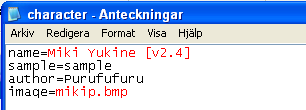
name= the name of your UTAU
sample=
author= your name or your alias on the internet
image= the pic.bmp we created (or whatever you named it)
now paste it into the character file. Close the file and SAVE IT.

Open UTAU - done~!

M-My picture file isnt showing in UTAU....can you help me? ;_;
SvaraRaderaThis worked great! At least on my Mac... But now I can make a professional looking UTAU! Thank you SO much!
SvaraRaderaMin bild vill inte visas. Den är i hans fil, 100x100 pixlar och i bmp men den gömmer sig fortfarande >_<
SvaraRaderaMy picture isn't showing :(
SvaraRaderaWtf with the picture, seriously ^^ ...... I try other ways to type the root of the image on "character.txt", but it won't work at all...
SvaraRaderaTake a drawing(or draw a new one) and make it 100x100 pixels - the save it as a .bmp (it WILL NOT WORK IF THE SIZE AND FILE TYPE ISN'T RIGHT)
RaderaAll the image properties were right but it still wouldn't work!!
SvaraRaderahi im having the same problem as everyone else with the pic, ive checked the files of an utau that isnt mine that works and its the right dimensions, do you know how to fix it?
SvaraRaderai have the same problem!!!! i made a pic into a bpm and its 100x100p, and i used the character.txt but it still wont load when i reload utau!!!! my readme.txt shows up, but it stil says no image
SvaraRadera(whisper)
SvaraRaderaI found a solution for my bmp problem. It seems UTAU is very picky about filesizes. I used a bmp-file which was 100x100p and 29.4 kb, and it didn't work. I copied the picture into paint.exe and saved it again as a bmp, its size turned into 29.3 kb... and then I was able to use it in UTAU. I hope this helps somebody...
:< *sneaks out of ancient comment section*
Hi everyone! I'm making an OpenUtau C+V English singular voicebank and I use VLabeler and Recstar for recording and OTOing! It's been quite a while, hasn't it??? Anyway, I'm wondering if this tutorial still works/could be applied to OpenUtau? (bro wdym ancient YOU'
RaderaRE ancient-- /j)
Now you're the semi ancient one /jjj
RaderaBut I've recently tried this, recorded all the files in Recstar. Zipped them and sent them to my computer, otoed them in Vllabeler, and now for some reason they won't install as a singer. Is the character.txt essential? How do I get it? Who knows. My point being is that there is some extra work to try and get the singer installed into OpenUtau. I'll update if I find a solution.
LADS I SOLVED IT!!
RaderaBasically in the new version of OpenUtau you need a few "extra" files for the voicebank to count as a voicebank and for it to count as a singer. I did a few different things, and any one of them might have been the catalyst so do try each of them.
You NEED a character.txt, readme.txt, oto.ini and character.yaml file in the folder WITH the audio samples. They also need to be in the ZIPPED version of your folder with your samples. Don't unzip anything just yet, unless its for otoing.
character.txt: just do what this tutorial says
readme.txt: You NEED to add it to the folder, but it can be empty for now, edit it when you like
oto.ini: edit your samples in Vlabeler, save them as an oto.ini file, then drag that file into the zipped folder
character.yaml: when recording my JP CV voicebank this generated automatically, but for some reason it didn't here. What I did was just copy the JP one over to my zipped EN C+V folder. Heres the text I used if needed. It needs to be a .yaml file.
text_file_encoding: shift_jis
portrait_opacity: 0.67
portrait_height: 0
Then I went ahead and clicked install singer, made the text encoding UTF-8 and made the phonemizer the Cadlaxa EN C + V one that comes with OpenUtau. Hope this helps someone like ten years down the line lmao